To the comodo team my windows 11 24h2 operating system fails when running comodo cleaning essential

No, the issue is not fixed for production version.
The problem is related to CCE kernel driver, you can use this driver from XCS, simply replace existing with this one in Program Files\Comodo Internet Security.

SHA-1: c6c314e90638d30732c36fd94d53d758bf8eaea0
Signed by Comodo and Microsoft

Appreciate the help Gene, but although VT finds it clean, there is the remark ā€œSigned file, valid signature. Revokedā€. This ccekrnl.dat version is not from XCS, but from an older 2017 CIS version (v.10) ccekrnl.dat = cckrrnl.sys v.10.0.2.6364 with date signed: 2017-10-13 13:18:00 UTC. ccekrnl.dat from CCE v.12.2.2.8012 with OK certificates (but one FP-detection by Sophos ā€œComodo KillSwitch (PUA))ā€ is the most recent version I found to still work in CIS v.12.3.3.8152

There’s nothing revoked in old driver, VT occasionally marks signatures as that; you can check it yourself with sigcheck.

Sigcheck
    Verified:       Signed
    Signing date:   4:18 PM 2017-10-13
    Publisher:      Comodo Security Solutions, Inc.
    Company:        COMODO
    Description:    COMODO Cleaning Essentials Driver
    Product:        COMODO Cleaning Essentials Driver
    Prod version:   10, 0, 2, 6364
    File version:   10, 0, 2, 6364 built by: WinDDK
    MachineType:    64-bit
    Binary Version: 10.0.2.6364
    Original Name:  ccekrnl.sys
    Internal Name:  ccekrnl.sys
    Copyright:      2005-2017 COMODO. All rights reserved.
    Comments:       n/a
    Entropy:        5.291
    MD5:    E6299BF936BA6EFC3012BFBE1AEB9DFE
    SHA1:   C6C314E90638D30732C36FD94D53D758BF8EAEA0
    PESHA1: E55B84C299C4DC0649428BE65D319B57EC4F6C6A
    PE256:  5928360D8A6920D7B912A4A1E41F47935D8CFE90BAF0D970FC96CBDEDDC7B85E
    SHA256: EB0426657CE5E22E6DDBFAEDCEB1D2B9363EF5696557EE5811B6D7E3338659BC

Anyway, be prepared that CIS will try to restore replaced driver with every program update check, so you better to disable program updates if you want to use CCE.

Comodo currently protects against boot time malware attacks.

2 Likes

I’m glad if some users don’t have this problem…

B

Comodo always had, and continues to have, protection against Boot Time malicious attacks:

Comodo and New Boot Time Malware

3 Likes

@cruelsister

I don’t doubt of the efficiency of HIPS. It’s among the top reasons why I have been with COMODO for all these years (that and the sandbox feature).

As you state: ā€œComodo always had, and continues to have, protection against Boot Time malicious attacksā€; that is true. I am referring to Boot Time Scans / anti-rootkit scans (which is a feature of CCE), not the Protection against Boot Time attacks (HIPS feature). Anti-rootkit scan is a feature that I haven’t been able to use in the last three years. I just don’t get why its taking that long to fix…

B

The Boot Time protection has nothing to do with the HIPS module (which I personally do not use), but instead Containment prevents such.

As to an actual AV scan at boot, I doubt there is either a need nor a desire for this to be implemented. No need as Containment (which loads preferentially) protects the system at boot, and little desire as such a scan would make too much time until the System loads.

4 Likes

Ran a CCE scan today on windows 11 fully updated and the same error occured while restarting to scan for rootkits, but with a different error message. (Please see the picture below).
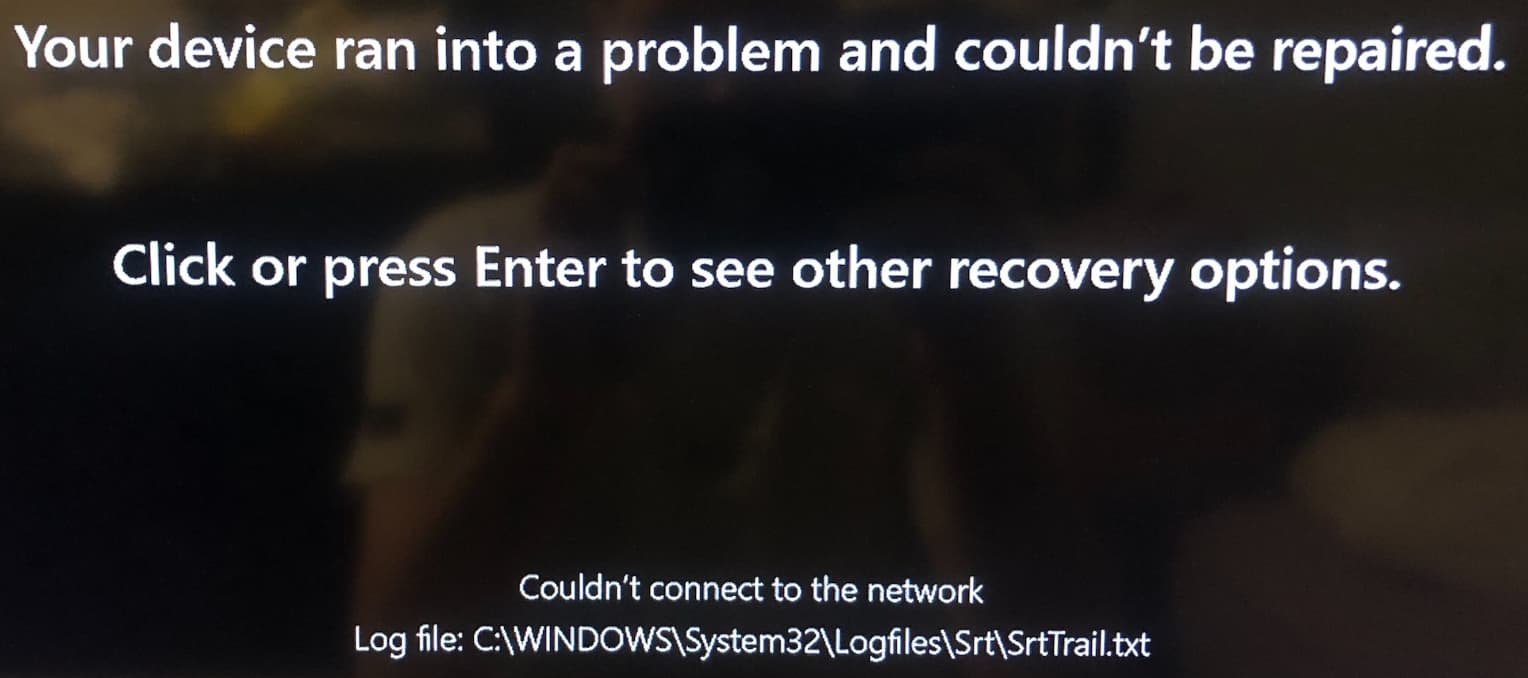

The content of SrtTrail.txt is the following:

Startup Repair diagnosis and repair log
---------------------------
Number of repair attempts: 1

Session details
---------------------------
*System Disk = *
Windows directory = C:\WINDOWS
AutoChk Run = 0
Number of root causes = 0

*Test Performed: *
---------------------------
Name: Start network for cloud remediation
Result: Completed successfully. Error code = 0x0
Time taken = 69203 ms

*Test Performed: *
---------------------------
Name: Detect remediation via cloud plugins
Result: Completed successfully. Error code = 0x0
Time taken = 6547 ms

---------------------------
---------------------------

Fortunately, I made a restore point with sysdm.cpl before running the scan…

B

Hi burialfaith,

Sorry for the inconvenience.
We have reported to the developers and they are working on it.
We will keep you posted.

Thanks
C.O.M.O.D.O RT