@EricCryptid, the mod, was super-helpful, yet again :), for pointing out this potential Kernal-issue as another avenue to explore/
This Microsoft Virus Initiative (MVI) 3.0 and the Windows Resiliency Initiative have probably happened by now, and thus implemented?
Don’t know, so am asking please.
Orig Source by Comodo Staff from Sept 22/2025:
In theory ‘this’ would affect handling of newer Nvidia drivers (>570 starting for 5***seriesGPUs) and their outputs? (Beyond my areas of interest and expertise)
Or, would Win 10 updated to last Oct2025 ‘allow’ for Nvidia info to pass to cmdguard.sys? Cue double-fault as per MiniDump. And that’s my issue?
Win11 appears to work (thankyou Eric for info on other thread!)
…but maybe Win10OS has gone in diverging directions, in terms of that stated kernal issue?
Did a 2nd reinstall 100% fresh, and used base Comodo 2025 setup and boot still failed.
So seems less likely a user-issue, but still maybe.
As mentionned before, am trying to assess my options.
Dearly want to use Win10pro/latestNvidiaDrivers and Comodo2025.
Very happy to pay as need to resolve this.
Just tell me how or PM me. Thanks so much.
final note: If Xcitium had a software suite that wasn’t so heavily Enterprise leaning i’d just pay and try that.
My vote: Believe in detection software first.
Should add to previous reply. (not sure why that lost reply to you status)
Just updated ComfUI.
It asked permissions for firewall this and that, auto-sandboxed several python scripts (pop-ups), and you have to add exceptions and re-run main .exes again after exceptions added.
That level of granularity is exceptional.
My only issue to date is HIPS and sometimes with more complex programs like OBS, suspect nested permissions cause some lockups (hard reboot needed). Eric mentionned he had to whitelist his Lenovo (in other support thread, so not just me). But that’s how comprehensive HIPs can lock things down.
Team is working on the Fixes and upcoming CIS release.
We will keep you posted. @Something_x2 This is to confirm you that your above issues/posts are in review.
We will keep you posted.
^^^^^^^^^^^
Thanks for the update.
I do prefer to keep using CIS as everything is all in one App Suite and centrally managed.
If it did discontinue then I like others will have to use separate tools to try and achieve the same overall protection but now decentralised management.
The version being tested is the 2025 version (and he doesn’t even mention the test version?).
The 2026 version hasn’t been released yet; it’s still in development.
So…
Thanks, I thought they already had a new pre-release version for testing. My problem is – I get worried too easily. It’s about nothing less than security, after all.
@cruelsister is right when she points out that lab results rarely reflect reality, where such scenarios almost never occur and no program can offer 100% security.
The fact that I’ve never had problems with cyberattacks, even though Comodo was my only security software, probably also has to do with my own browsing habits. Besides, no cracked software, nothing from dubious sites, etc., etc. And perhaps not very attractive to attacks. What good is the best lock if you become careless because of it? Comodo has a very good lock, the firewall with several other components. This is constantly being confirmed.
Currently, my setup looks like this: cis+cyberlock+hitmanAlert+VPN (antivirus disabled in Comodo). These don’t interfere with each other. Scanning with KVRT occasionally (apparently no longer available, at least temporarily + you can update again).
( @cruelsister права, когда говорит, что результаты лабораторных исследований редко отражают реальность, где подобные сценарии почти не встречаются и ни одна программа не может обеспечить 100%-ную безопасность.
Тот факт, что у меня никогда не было проблем с кибератаками, несмотря на то, что Comodo был моим единственным средством защиты, вероятно, также связан с моими привычками при работе в интернете. Кроме того, я не использую взломанное программное обеспечение, не захожу на сомнительные сайты и т. д. и т. п. И, возможно, я не очень привлекателен для атак. Какой смысл в лучшей защите, если из-за неё вы становитесь беспечными? У Comodo очень хорошая защита — брандмауэр с несколькими другими компонентами. Это постоянно подтверждается.) " Dear prodex, I agree with you and @cruelsister. I will continue to use COMODO
Very grateful to know is in queue to be looked at. Hopefully clarity for me. Will adjust my expectations to wait with ‘long extended patience’. Thank you!
And I will no longer allow myself to be unsettled so easily Comodo alone can’t offer 100% protection, and neither can anyone else. I know of a case where a user blamed Comodo for a successful cyberattack. I kept pressing him until he admitted to have downloaded cracked software from an obviously unofficial website and allowing it to be installed. If I open my front door because someone promises me something, then even the best alarm system won’t help me anymore.
Installed a new computer with 23H2 Win11 Enterprise, then drivers, then CIS2025 Premium 8162.
After reboot it autosandboxed some .vbs scripts related to windows setup that broke them from working (just some tray icon powershell stuff) and then I was unable to open the CIS Control panel.
A while later I get a popup that there is trouble starting CIS and if I would like to attempt a fix, which didn’t work.
Then I fired up the control panel add/remove programs to remove CIS and it took -ages- to start up, I selected the repair option first - which did nothing.
I then selected Uninstall for Reinstall purposes… and the uninstaller shows up with a GREEN BORDER, so it got sandboxed…
So Guess next step is safe-mode booting to see if I can disable CIS so I can uninstall it before attempting a new installation.
–
meanwhiløe 8012 on my main computer “never” had an issue … ah, progress.
Update: Reinstalled after doing safe mode to remove the previous installation and all was working well…
UNTIL I changed these settings: Then comodo stops working
Then comodo stopped responding as soon as I pressed OK.
HIPS and Firewall were set to TRAINING mode at this point so they shouldn’t have blocked anything. Autosandboxing was also disabled (due to earlier issue).
Att: @C.O.M.O.D.O_RT
Question : Is there a way to re-activate those settings through registtry access in safe mode? I cant seem to find a setting that looks like one of these in registry, but I see most of the other ones.
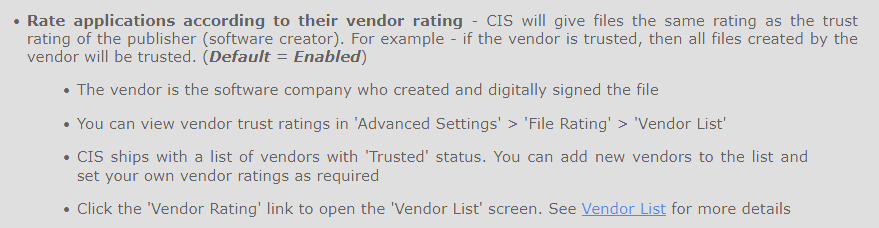
I believe this is a known bug. You need to either manually add the Comodo program Folders and Windows folders / files as safe in File Rating or you can purge the list with the exception of Microsoft and Comodo. The issue is that with that rate applicationed unticked is that CIS/CFW won’t trust the process until verified in the cloud but having sandboxed it’s own processes, that connection doesn’t happen. The issue isn’t there with version .8012. Do check you are using the latest version though.
Unchecking those boxes is a very bad idea as it will disable a form of protection that Comodo (and few, if any, others) have. Comodo has a trusted vendor list, as well as the setting that will not trust a file (even if signed) until first vetted by Comodo and approved.
The importance of this is that an application even if it has valid Certificate AND has been legitimately Counter Signed it will NOT be allowed to run uncontained- this can save one from being infected by a truly nasty zero-day malicious file. This has done so in the past by preventing the damage from CCleaner and E-File infections.
If you want a recent example of this, note that just yesterday Kaspersky uncovered a State Sponsored rootkit that infected systems in Asia. Using Comodo with containment active and BOTH of the File rating settings left enabled would have protected from an infection that will bypass other AM products.
So unlike most vendors where they find a “Aha, a trusted certificate, that must mean I will give this application the keys to the kingdom” the trusted vendor list in Comodo relies on FIRST the trusted certificate, and then the actual hash of the application that they verify as “Safe” before it is given the keys to the kingdom and can bypass anything you’ve configured in HIPS?
When the first thing that “pops” on the list of ‘Trusted Vendors’ is company names like “Beijing Huahong…” that makes me skeptical to having that option active. (Or NSA for that matter… I dont discriminate in my distrust of everyone… )
Regarding the rootkit example, With HIPS in Paranoid Mode and these settings disabled - would that rootkit bypass my HIPS setup?
The thing is. Comodo may trust these vendors and the software they make might be considered “safe”, but that doesn’t mean that I do
On my old setup the only trusted vendor I had in the list was certain certificates from Microsoft and Intel after cleaning the massive list.
This seems to be different from how it is explained in the documentation?
From reading that, it seems to imply that as long as the vendor is on the trusted vendor list (i.e. their signing certificate) then all files using that will be trusted. Or did you mean that if I use that list - AND Cloud Lookup - then I have the, for most people, correct setting.
Thanks for the information and suggestion. I will attempt this.
Another question. on my new offline computer I’ve had it running in Training mode on HIPS for a few days and I see that it then gives almost every application permission to Kill Processes, Install Drivers, Full disk access etc. Is there a way to have the training rules be less permissive and yet still allow the explicit requests from the application and add them to the ruleset for it - as in: I want to give application X permission to do what it attempts to do while it is running TRAINING mode, not a lot of “extra” permissions?
The application/file is included in the Trusted Files list
The application is from a vendor included in the Trusted Software Vendors list
he application is included in the extensive and constantly updated Comodo safelist
I reported this bug about 1 year ago and Comodo didn´t fix it !
Comodo trusts the trusted vendor doesn´t mean that I must trust them.
And why is there a checkbox anyway when unchecking it makes CIS stop working ?
Why this bug is not fixed after more than a year ?
I think most users will never uncheck it so it probably wasn’t a high priority considering there is a workaround, but I agree it should be fixed (or even just a tooltip warning what it implies and how to remedy it if the bug is too difficult to fix)
In version 8012 you could uncheck the box, no problem ! What is so difficult to fix it then !
And 1 year not fixed shows us how important we are hahaha!
Always “We will report to the team and come back to you” which never happened !!!

 )
)