“We will be distributing updates to existing users in the coming weeks.”
I’d rather say next months … 
But if the version is this, it still doesn’t work on my PC so I know that maybe I will wait for version 12.3.xxx when it comes out.
“We will be distributing updates to existing users in the coming weeks.”
I’d rather say next months …
But if the version is this, it still doesn’t work on my PC so I know that maybe I will wait for version 12.3.xxx when it comes out.
Looking forward to CIS V12.3 as well. :-TU
Can’t wait!
I can not wait too.  :-TU
:-TU
I just hope I won’t wait another year … ;D
Comodo is failing users in a big way by not providing update to the program updater for the wider audience.
If you install this build over your previous build as CISfan describes CIS will save your current profile under another name (you will find it in Configurations which you can simply activate. It of course never hurts to save your current profile as a good general practice; the step of saving and importing you current profile as CISfan describes is not strictly necessary.
EricJH
I do not know much. I want just Comodo find the new update. I don’t want to go search the forum for new version. I hope you understand. But I had few problems with latest CF version, so I hoped when I will got auto update there will be no problem with it.
All we can offer if you want the update now is to install on top of your previous version.
We don’t hear from Comodo. The current development team is not communicative at all. That is a big grief among both forum members and us mods.  :-\
:-\
Hello EricJH,
Regarding to the next release : CIS team are working in it and soon it will be updated.
Have a nice day!
So I just tried to install over previous version but it does not work. There was some error. I tried uinstall it and there is a new error…
You could try to Repair the CIS installation to get it working again. Here’s how to do it (the guide is taken from Microsoft site):
Repair programs in Windows 10
Repair options from the Control Panel
[ol]- In the search box on the taskbar, type Control Panel and select it from the results.
I did repair too. It does not helped me too… I uninstall it through CIScleanup.
Did you manage meanwhile to uninstall CIS completely?
Or are you still getting uninstall errors?
Hello radek178,
Thank you for reporting.
Have a nice day!
Hey radek 178, Even Though by using CIS removal tool,now too you are facing this issue ? Please let me know your status of your issue.
I just upgraded from an older Comodo Personal Firewall install (a 12.0.x branch that was very stable and good). Upgrading was arduous to say the least. I had to :
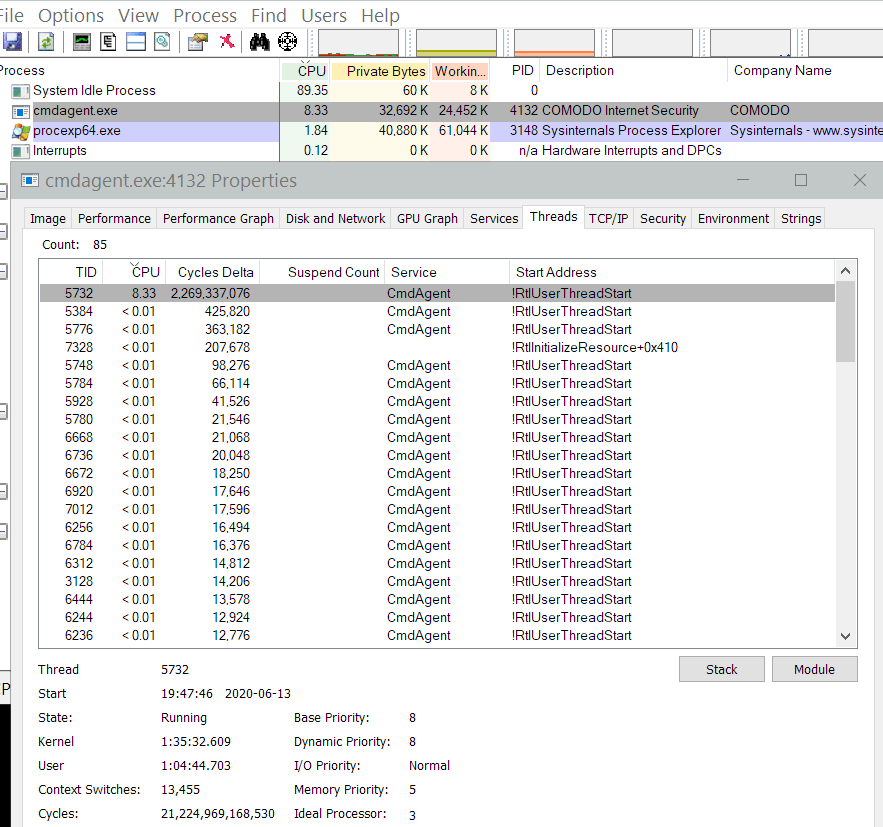
So bravo there. Really fine software. Now with this latest version, cpu usage for cmdagent never stops using 100% of a thread.
Here’s a screenshot of process explorer showing it:
I’ve used the uninstaller, followed all the instruction, cleared the Registry, same as you did, tied to install this version and was told that I didn’t have permission. Logged in as Administrator and ran the Setup as Admin.
Trouble is, hell of a faf uninstalling, trying to install, cleaning the Reg again due to a few bits left, re-intalling the 12.* version, importing the saved Config. only to find that Comodo asks all the questions again.
This was with the offline installer. Trying for an Update simply installed some cr@p that I didn’t want - Safe Browsing? or something like that.
It’s time that updating did not require, messing about with HOST file, uninstalling and cleaning up, having to install online when the FW has been uninstalled (who came up with that bright idea?!) and simply just worked.
Having said all that, I do really appreciate Comodo, as it’s much lighter and less intrusive than most alternatives and is also comprehensive - thank you.
@retry. Could you try uninstalling using the Official Comodo Uninstaller v3.0.0.41 and let us know if the problem persists or not?
Do you have other security programs installed? Does resource monitor a clue as to what cmdagent.exe is doing?
Dude, I’m not your QA department or beta tester. I uninstalled and went back to 12.0.0.6818 – this version is stable for me. Obviously there’s a regression somewhere, and it’s nasty. Looking at alternatives now. I hear good things about TinyWall. Been a Comodo Firewall user for so many years, I don’t even remember when I started anymore. But your upgrade path is unreliable as hell. Did you fire your QA staff like MS or something?
I am not a Comodo employee. Mods are end users like you and all others. Apparently there is a regression and it’s why I asked if you were willing to reinstall using the clean up tool. We ask to do this to be sure CIS gets properly uninstalled. It provides a clean slate for further reporting.
I see you were using 6818. If you are interested in a more recent build you could consider using 6882 which is very stable. You can get it here; Comodo Forum .
Thanks I might try it out if I have a lot of free time to ■■■■ since reverting is non-trivial. I did use the comodo uninstaller tool after my first attempt to upgrade with the regular installer failed miserably. I had to, because none of the installers would work otherwise. Then I used the offline installer to upgrade to the latest build. Then I had the CPU problem. Then I reverted using regular uninstall and an older version of the online installer from File Hippo.
Incidentally, lots of people use a non-persistent ramdisk for Temp these days with SSDs being commonplace. If comodo needs to finish its install after a reboot, it should recognize that Temp may not be the right place to leave content to run afterwards.
Frankly if the last 12.0.0.x version has no CVEs, I’m content to stay with it. I only care about updating if there’s a security issue to deal with. New features = bloat.
If you have a dynamic IP, you need to enable outgoing DHCP for svchost. For me after that, cmdagent loads the processor by 0 … 0.3%.