I am using comodo firewall for some time and I never had any problems with it until today. So, as usual, I was programming in vscode and, as just any other person, I was constanly saving file changes and comodo never complained about some process trying to modfying a file.
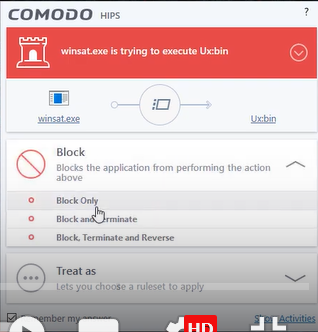
But today this happened and I found it pretty weird, it was a process called “provtools.exe” trying to modify a file (which now I know that was just vscode requesting to save file changes by requesting it to provtools.exe, or something like that), so I selected “block, terminate and reverse”. This was a big mistake, because now I can’t:
- Create any type of file system wide
- save any type of file system wide
- open any type of files that weren’t already open on system wide level
- search things on the windows menu
I need urgently to know how to reverse this situation, for I need provtools.exe to have its permissions again. So I have a couple question:
- Using comodo firewall, how can I allow provtools.exe to gain its permissions again
- Using some built-in windows feature, how can I allow provtools.exe to gain its permissions again
- If I just restart my PC it will gain its permissions again, or it will just crash for, it can’t even create files, so I wonder how it should create temporary files for boot up ?
- If I uninstall Comodo, would all come into place again or, not even it won’t come into place again, as then I wouldn’t even have the possibility of installing it again for I won’t be able to installing it again since I don’t have the permissions needed ?
Bellow, there is a picture of the pop-up window that appeared to me (It just similar to the one it appeared to me, it is not exactly it)
EDIT: If this is useful, I can still plug in a pendrive and create files there