Hello everyone, I have a long-standing question recently. Because I need to use Comodo in an offline environment, I used to Comodo Anti Malware Database Latest Version & Additions 2023 Go and obtain the latest bases.comav file for virus library upgrade. But I found that although virus database update messages are normally published on this website, such as Latest Database Version and Total Definitions, the bases.comav downloaded from here has not changed since January 26th, and the MD5 of the file has always been 5154a6800b9a669601d1dd29740f9fa2. I download the same files from different machines. I don’t agree with the idea of adding features but not changing the virus database.
I want to know what the reason is? Is this upgrade website no longer valid? Where can I get the latest bases.comav?
I downloaded it and I can confirm the MD5 file hash is indeed 5154a6800b9a669601d1dd29740f9fa2.
When fresh installing CIS it will download the available complete bases.cav and subsequent incremental updates. The complete bases.cav only gets updated but so often but I don’t know how often.
As a consequence latest database version is not the same as the complete bases.cav. The published latest database is 99% of the time the latest available incremental update.
Hi thank you for your response.
Since I am using Comodo in an offline environment, what other files do I need to put in my offline environment besides the bases.cav file?
In addition, I have also installed Antivirus and upgraded it online, but I found that the bases.cav file has not been updated. Even after the fix, it was modified on October 1, 2019, and the file size is only 9.64MB. I think this is not a complete bases.cav file. Speaking of incremental updates, I was informed of the virus library version (which is the latest) through the GUI, but I only noticed changes in C:/ProgramData/Comodo/Firewall Pro/cislogs.sdb and C:/Program Files/Comodo/COMODO Internet security/Security Product Information. ini, but the file size is less than 1MB, and the C:/Program Files/Comodo/COMODO Internet security/scanners directory is only 17.1MB, because I don’t think it’s really updated. If it really updates, how can I prove it?
I see what your use case is. Bases.cav is no longer stored in Program Files but in c:\ProgramData\Comodo\Cis\signatures. The bases.cav in Program Files is best considered a relic and something that was probably forgotten to be removed.
The bases.cav in ProgramData is always the updated version. Upon installation CIS/CAV will download the latest complete database and then the incremental ones and will all be merged in the bases.cav file in ProgramData.
There is no web page where incremental updates can be downloaded. In your case you would have to download definitions online on another machine and then import the bases.cav from the online machine on the off line machine. You can import a bases.cav in the About box.
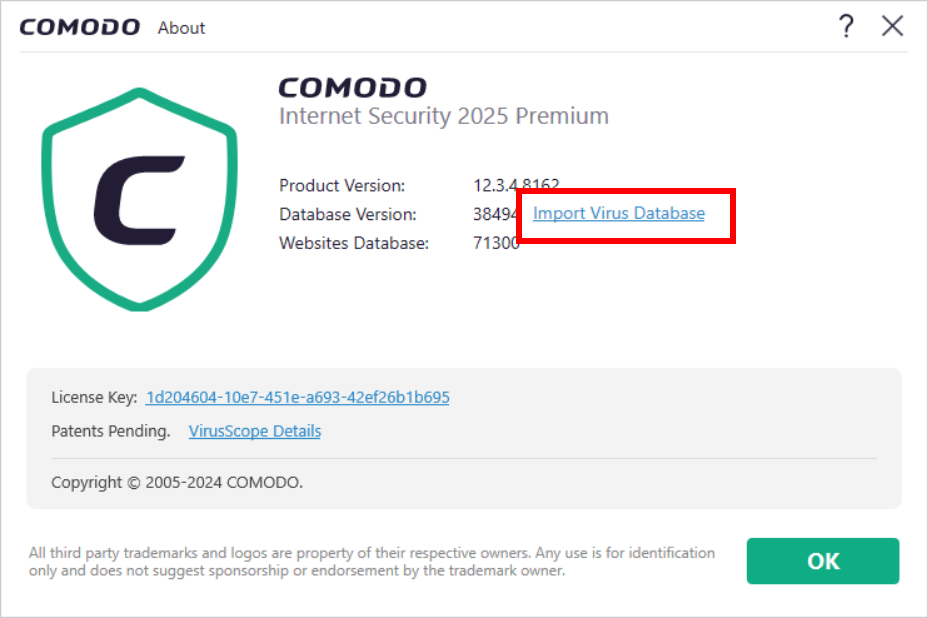
Thank you for your guidance
I have two questions. The first one is to confirm that C: \ ProgramData \ Modo \ Cis \ signatures \ bases.comav will be continuously updated? As long as Comodo’s virus library releases new updates (such as adding features), will this file be updated?
The second question is, I saw that C: \ ProgramData \ Modo \ Cis \ signatures \ bases.comav only has 250MB, while bases.comav downloaded from the website requires 608MB. Is this a normal situation? Why is there such a big difference? Does it mean that the bases.comav downloaded from the website contains invalid virus features? If I only import C: \ ProgramData \ Modo \ Cis \ signatures \ bases.comav on an offline machine, can I ensure that the latest virus database is used when detecting files? Can this file also be used for the Linux version of CAV?
Indeed. That is the file that gets updated when newer definitions gets added by the updater.
CIS has two database sizes. The complete database of 608 MB and the reduced database which is approximately 250 MB in size. The reduced database was introduced to increase performance (make CIS less heavy on resources). A lot of old viruses that are thought to be no longer active were removed to reduce the size. With default settings CIS will download and use the reduced database.
Enabling the full database can be done under Settings → Update → Use full signature database.
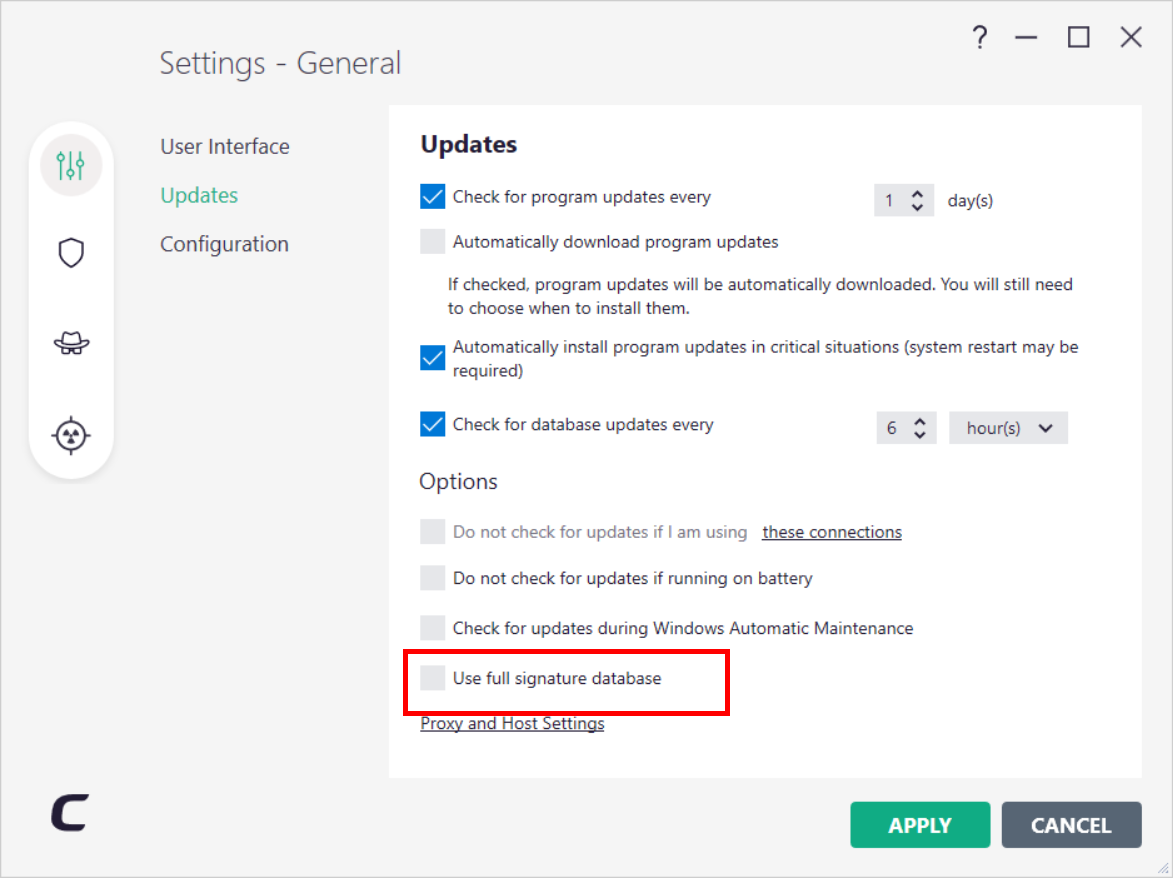
I saw that the online Help of CIS does not show the Use full signature database setting.
I have no idea. It’s been ages that I toyed with Linux and CAV on Linux. I don’t know if it still functioning properly under Linux given its age and the fact that it is no longer supported.
Okay, I see. Thank you
Domain suspended or not configured
If you are the administrator and believe this is an error on our side, please check your BunnyCDN account configuration or contact customer support.
My CIS is not updating & returns errors for all 4 parts.
These are my host assignments for update:
download & downloands comodo com
10 100 11 11 & 10 100 11 12
cdn download & downloads comodo com
download-cn comodo com
I have all of these added for both https & http but I only test 3 at a time. None of them have worked. I also have my DSN numbers assigned based on what I found in this forum.
I know CIS can import an update file so I’m looking for the latest one for March 21, 2026. My CIS was last updated error free on March 20, 2026.
Please advise. Thank you.
New Version 12.3.4.8162 Available for Comodo Internet Security 2025
I got the same bunny net error for this link
https://cdn.download.comodo.com/cis/download/installs/9070/standalone/cispremium_installer.exe
Please advise. Thank you.
Hi, thank you for reporting.
I had noticed earlier today that CIS did not update its definitions showing errors on all four checks but had not looked further into this under the assumption it likely was a temporary glitch.
I clicked on both links and arrived at a catch page from Bunny CDN with the following message:
I have notified Comodo about the problem.
Ok. I’m assuming there’s nothing I can do on my end. Still, I’d like to experience the import file feature in CIS. I’ve never done that before. Is there a working archive or mirror link I can use to download that? Please advise. Thank You.
There is no mirror to my best knowledge. If you want to download the complete bases.cav from Comodo you will have to wait until the problem is fixed.
You can try the import file feature with the bases.cav from the online computer. I have a triple boot system and in the past I have imported the bases.cav from one of the other Windows installations because it was faster than downloading. That’s the type of freedom the file import feature permits. 
Ok. How do I get the latest bases.cav file? Thank You.
From what I understood you have one system that has an online connection of which you can copy the bases.cav to test the importing procedure on the offline computers.
The bases.cav as linked by Comodo Anti Malware Database Latest Version & Additions 2023 is currently not available due to the server configuration error.
I could upload my bases.cav to Google Drive or similar if you would like.
The most recent bases.cav I have is dated Nov, 2022 so I’m assuming that happened when I downloaded Cleaning Essentials. I’m likewise assuming that yesterday AM when the update worked fine the guts of CIS has all that data even though it did not make a copy of this file. I think it’s a good idea to get a more recent bases.cav file as a backup. If you have one dated today, great. I’m most familiar with G Drive so please & thank you.
Check your pm for a download link from Google Drive.
https://status.one.comodo.com/ui/#!/
been looking through Xcitium’s website and found the following regarding a maintenance update. Would this be connected to the recent link outages and update issues?
This only applies to XCitium, not COMODO.
Thank You, but it is working again. Full update thru checking for program updates. If I import that file it may be dated vs that. I think it is best I not use import file at this time. If you have any pull with Comodo advise them to offer a backup/emergency server host name that clients can add to their host settings. This server should make use of a different net service than bunny net for redundancy sake. One of the reasons we have remained loyal to Comodo all these years is we trust in their attention to detail. This is one that now needs to be addressed. Once again, thank you for your time & effort in this matter.