I was updating my AMD drivers yesterday and I kept getting scripts isolated by Containment. Things seem to work fine afterwards and I didn’t get any errors from drivers but I kept getting popups about it. I also got it for many other things I’ve been installing. What’s up with that and clicking the button to not sandbox them again doesn’t really do anything since they run one time only. How to address this if at all?
Having updated drivers alot, though mine are Nvidia, i do not remember this at all.
And have ON - containment, script analysis, and heuristics on above low too.
That’s odd you keep getting pop-ups after the initial acceptance.
Have you made sure you are updated to latest comodo? (probably not it, but step 1 anyway).
So guess can only share, on my setup am not seeing this behaviour, but i’m not using an amd gpu driver. But use many other things without issue with Comodo heavily on.
You can’t really exclude or “Don’t isolate again” when it doesn’t re-open by itself and I don’t even know from where exactly the script comes from and how is captured by Comodo. So far I haven’t noticed any issues, but it can’t be good if it isolates scripts because then they wouldn’t do what they are suppose to do.
What you are experiencing with the Scripts being contained most frequently occur with application cleanup scripts. The way they are coded are in 2 stages- stage 1 is when things that will be unpacked (usually) in the AppData\Local\temp folder will initially be deleted by the script once the application finishes; Stage 2 will ensure these files will be gone upon reboot. Comodo will contain the actions of Stage 1, but will allow Stage 2.
As this may not be clear (my habit seems not to be), you can demonstrate this for yourself quite easily with Kaspersky Virus Removal Tool (KVRT):
1). Download KVRT.
2). BEFORE running it, clear EVERYTHING from the AppData\local\Temp directory
3).Now disable Containment, and run KVRT (you don’t have to do scan!). With KVRT still open, look in the Temp directory- you should see a few entries. Then close KVRT and these things should vanish as the script is coded to delete them.
4). Now Enable containment and open KVRT again. Note that those few entries are populated again. Now close KVRT and you will get the Containment alert and those files will still be left in the Temp folder.
5). reboot the system and recheck the Temp folder- the stull KVRT created should be gone.
Aside from the above, similar action can be seen when temporary driver sys files are created. Also as these scripts created by the applications always have slightly different file names, they will also be seen as new by Comodo, so telling Containment not to block them again will result in no Joy. But anyway, pretty much ignore these alerts as nothing malicious occurs.
Hope this helped!
m
2 Likes
I checked the scripts location in CIS folder (tempscript) and I found bunch of those scripts from containment “isolation” events…
One from AMD drivers was this:
powershell.exe -Command Install-ProvisioningPackage -PackagePath “C:\WINDOWS\System32\DriverStore\FileRepository\amdppkg.inf_amd64_27762fb4b4d122d3\AMD.Power.NVMe.ppkg” -QuietInstall
I have no clue if CIS broke something, drivers didn’t outright tell me there was any error during install, but if it’s isolated by CIS, I’m assuming the script above did absolutely nothing because it was running in containment.
It’s the AMD drivers running powershell scripts. If you can identify the driver updater, you can add it to exclusions for Shell Code injection but you can safely ignore these. CIS/CFW creates these tempscript files to protect against filess malware. In my case, it was the Lenovo diagnostics so I added an exclusion which still protects me without blocking powershell scripts for it specifically but if that lenovo service should ever be compromised, that exclusion would be a bad thing. Anyway, the cause is the script analysis for powershell with shellcode injection enabled.
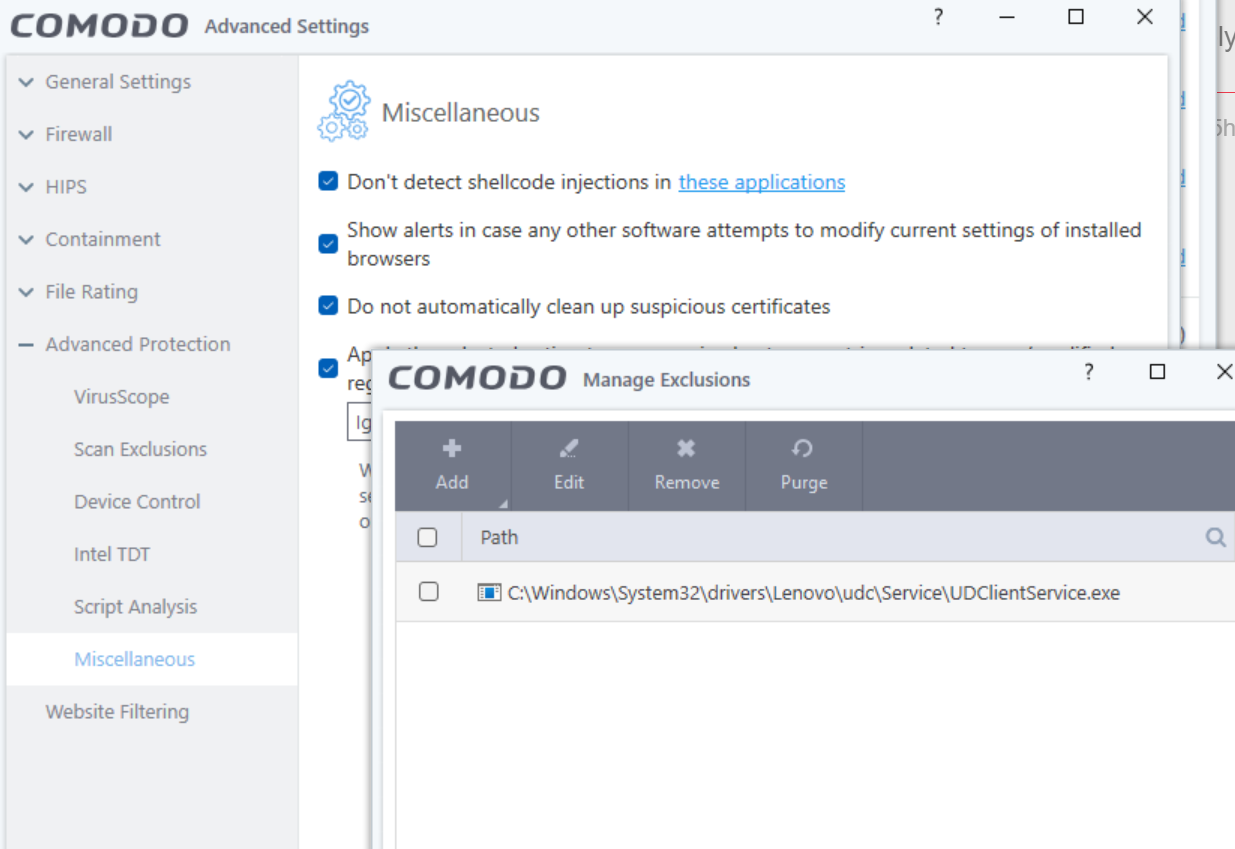
Okay, but I need to do all these “gymnastics” ahead of installation of something and digging out individual programs doing this it just makes no sense. The “Don’t isolate again” on popup doesn’t help since script won’t re-run and I can’t tell if things installed properly afterwards or not. At least I didn’t get any errors, but can’t be sure. If script was isolated it was basically doing things into the void, so god knows what’s not working as expected but isn’t outright erroring.
Also, is this done by Script Analysis feature? Shouldn’t this just be analyzing them and not fully isolating them? Or does CIS isolate it first, analyzes it and if nothing malicious found it runs the script without isolation?
You don’t have to do gymnastics, CIS/CFW will check the file is safe but yes, these created script files if unsafe will be sandboxed/contained but you can whitelist them individually. You can turn off the shell code injection for powershell.exe but it’s better just adding and exclusion rather than blanket allowing powershell scripts. @cruelsister can explain it a little better than I can but even if I don’t create a exclusion, it’s not hindering my system at all, just those background diagnostic / update scripts get blocked and contained. There were some good historical reference posts but they disappeared when Comodo moved the forum software from SMF to Discourse. At the end of the day, it’s protecting you fom bad scripts but it’s up to you if you end up disabling that feature which would be a mistake as outlined in @cruelsister 's video here: The Importance of Comodo’s Script Analysis
1 Like