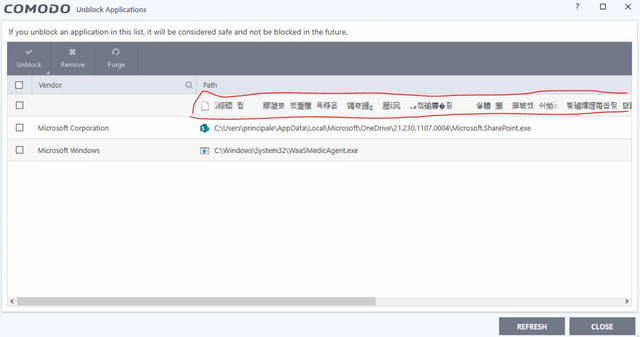
Hi, The attached shows the display from the Unblock Applications view, I didn’t seem to have a menu path as you suggested.
I am running Comodo Firewall 12.2.2.7036 on Windows 10 Pro, 2004 update. I managed to find some ANSI entries in the log file which I could remove, which leads me to believe its the KANJI characters that are causing the issue. When I hover my cursor over one of the entries, they span 8-9 lines as you can see in the 2nd attachment.
I merged your topic with this existing one of the same issue which appears to still not be fixed yet. Also you need to look at the firewall event logs and ignore the blocked applications list as that is not useful in knowing what is happening.
The only reason I logged the issue, it is that there are so many entries of this type, its difficult to find real entries that were blocked so I can either ignore them or unblock them
As futuretch says . . . either ignore the Blocked Applications list (which invariably has entries after a start or reboot before CIS fully loads), or just check them All and Remove
thx, but if you had bothered to read my original post, I cannot delete them!!, I can select them but they never go away as the long Kanji name must be causing an exception & the program cannot remove them!!!
I did read the original - the point is to make sure you don’t just unblock the entries that you can. That will just start making extra rules which you don’t need
Remove the ones you can or just ignore them all together
Recently I noticed the same behaviour of Comodo CIS crashing / not working and the Chinese alerts from localhost… I thought was the only one but luckily I see I’m not
reading the previous comments i understand is kind of misbehaviour right? also from what I see on the Beta this bug is fixed - is there any ETA for the production release or should I stick to the beta ?
I’m currenlty with the 12.0.0.6818
EDIT: While checking the last version on the forum seems I’m not running the latest ?
The latest version 12.2.2.7036 still has that occasional bug for some. If 6818 is working for you otherwise - it’s up to you really. A new release is due within 2 or 3 weeks (unless delayed) with a lot of bug fixes and this could be one of them. So if you can ignore this issue and wait a while, it may save you two new installs with a chance it’s isn’t solved for you, instead of just one for a new release
It’s a harmless bug, but I know it can be irritating
Bit offttopic question,as other person mentioned i thought my CIS would automatically update to the 2020 last version but seemed not. in any case do you recommended use the cleaner to such upgrade? or i can just install and upgrade automatically without needed to remove and re-import my settings?
Comodo hasn’t released the latest version through the update facility yet for some reason and I doubt they will before the next release, but it’s always recommended to export your current Config whichever method you choose, as a backup in any case
The latest 12.2.2.7036 (2020) has been tested with installing over previous versions without a problem Update Testing but always be prepared for the possibility of something not working correctly on an individual system and then go the Clean Install route
This workaround should solve your problem.
1-)Try to rename cmddata to something else. If you are not able to do this, then run Windows in safe mode and then rename/delete cmddata.
2-)Clean uninstall CIS and then install latest version CIS 12.2.2.7098(Recommended).
Ciao a tutti,
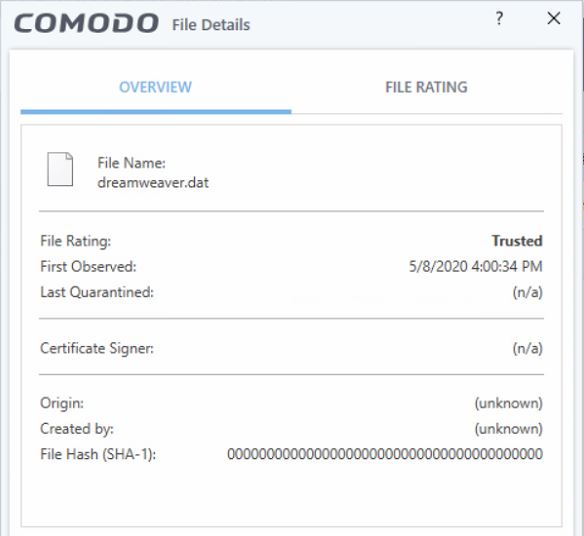
ho inserito un’applicazione portable (dreamwaver 2020) nel mio pc con window 10 (home edition) funziona correttamente ma non mi esegue più il comando di comparazione previsto all’interno del programma (nel mio caso winmerge), andando a verificare nelle applicazioni bloccate trovo questo file che non riesco a rimuovere e che fa riferimento ad un dreamwaver.dat che non esiste più, inutile premere purge o remove, non succede nulla.
Questa configurazione (Applicazione portable + Comodo + Winmerge) funziona alla grande su window 7
PS: Effettuando lo scan con comodo sul file dreamwaver.dat non viene segnalato alcun virus, e anche con un’altro software antimalware nessuna segnalazione in merito.
Hi thank you very much for your support, here it is informations requested:
1. CIS version
Product Version: 12.2.8012
Database version: 34218
Website Database version: 34218
Winmerge version? 2.16.80 x86
Dreamwaver version ? 20.0 - 15196 Build (Please note this: portable application, based on vwvare virtual machine)
System bit type (32bit/64bit) Microsoft Windows 10 x64 Home [Version 10.0.19042.1415]
Is there any other security product installed on your machine? Yes Malwarebytes Premiun Trial 4.5.0.152 (Please note this: I just installed this application after discovered file dreamwaver.dat from comodo blocked application).
NOTE 2: I just use the comodo features of Firewall and Antivirus, Autocontained, HIPS,l Virus Scope, Website filtering are switched off
NOTE 3: On PC with windows 7 x64, same configuration (Comodo Antivirus, Dreamwaver an Winmerge works fine)
If this could be useful, from event viewer (Application and service log)-> Comodo Internet Security
It is a long-standing issue that I am afraid won’t be fixed as it seems to be quite random on when it happens and what causes this issue, only thing you can do is do a re-install of CIS.