thanks for your answer Eric, should I just uninstall the current version via Windows and then install the new version? or should I use some special program to clean up my system before?
You should be fine just using the normal installer as it doesn’t tend to leave much of anything behind but there’s also the option of running the uninstaller tool after the windows uninstall http://download.comodo.com/cis/download/installs/ciscleanuptool/CisCleanupTool_x64_3.1.0.45.exe just to ensure everything has been removed and then after reboot, do the fresh install.
Hello, I have two versions of COMODO on my machine: an older one and the latest one.
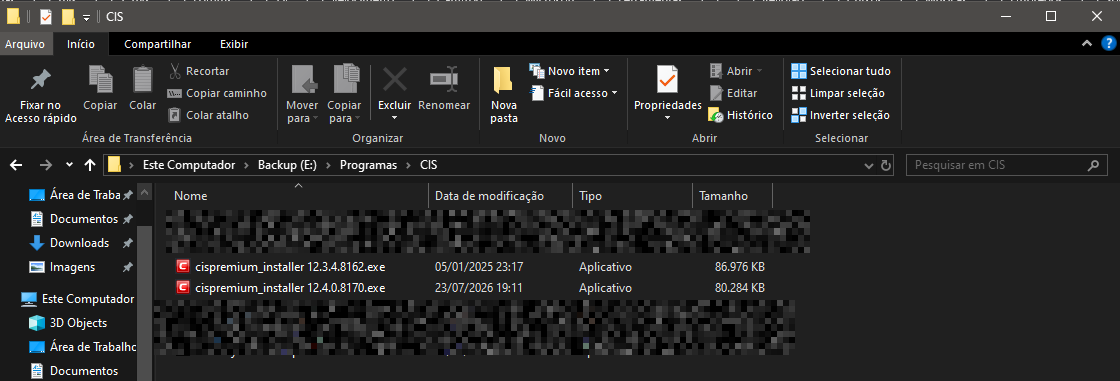
I’ve noticed a 6MB difference in size between the older version and the newer one.
This suggests that the older version contained something that the newer one does not.
My question is: what was added and what was removed to account for this 6MB difference?
Does anyone happen to know? I’ve included an image below for reference.
Looking forward to your replies!
You can unextract both to find out what they contain, everything is spread into different folders with each of the packages.
1 Like
so, nothing yet regardless the issue with the extra tools they said had security problems?
Hi everyone,
I have been using Comodo Internet Security for years now, but I haven’t checked for new vulnerabilities lately. Yesterday, while running a cleaning essential scan, my Windows 10 system crashed to a Blue Screen of Death (BSOD). I managed to fix it by removing a driver named cjxtpv.sys.
However, today I checked the vulnerabilities for my current version, 12.3.4.8162 (which I have been using for about 2 years since installing it in 2024). I noticed that severe vulnerabilities—specifically the update hijacks (CVE-2025-7095 and CVE-2025-7098) and the local privilege escalation flaw (CVE-2024-7251)—are fully active on it. I also read that the new 12.4.0.8170 (2027) version is affected by a network crash flaw (CVE-2026-49494).
Given all of this, what should I do? I need to find out if my system was actually infected by that driver, and I want to know if I should upgrade to version 12.4.0.8170.
I have run second-opinion virus scanners—including the Microsoft MRT tool, Malwarebytes, Emisoft Emergency Kit, and the Kaspersky Virus Removal Tool offline—and no malware was found.
For those using the 2027 version: Is it stable? Do Comodo KillSwitch, the firewall, and the other core tools still work properly? Are there any major feature downgrades or frequent crashes I should worry about?
I normally use the default configuration, but I have made several custom changes over the years and I am worried I will lose all of them if I reinstall.
Any help or advice would be greatly appreciated! Thank you.
1 Like
There’s a security issue with Killswitch and Cleaning Essentials [post] so please don’t use it. They were going to release a removal script and ship CIS without it but no update a month later.
The inspect.sys CVE from previous versions hasn’t been verified if .8170 is affected so probably an idea just to disable IPv6 on your machine though an attacker would have to specifically to your machine with a buffer overflow IPv6 package and still bypass your router which will likely have a default block setup anyway. Privilege escalation was fixed with version .8162. There was some CVE about updating not being over secure connection or something but if you enable ARP anti-spoofing that will mitigate that issue.
CIS 2027 on the whole runs pretty well. I’ve had a icon disappearing issue when I disabled traffic annimation though CIS was still running and on a couple of occasions it’s taken a long time for it to showing as turned on in the security centre.
Anyway, signatures and cloud database shared with Xcitium and some 3070 signatures were added the other day though CIS still ships with a light version of the database. You can enable full database download in the Updates settings.
I have separately PM’d the devs about the Killswitch/CCE issue which they are still working on and I also PM’d them about the IPv6 BSOD but nothing beyond them checking the team.
You can always export your settings first by going to Configuration and selecting your active configuration and then selecting Export.
I’m not a fan of the new UI so you can change it to Lycia for the original look which I find is more informative.
1 Like
Should I update to 8170 or not? Version 8162 is currently working without any issues. I don’t use ‘Killswitch’ or the cleaning essentials, though Killswitch was useful occasionally. What should I do? I don’t think anyone will target my router since it’s just a personal home connection, so I’m not too worried about an attack. do I need to update to version 8170? Are there still major bugs left unfixed in 8162?
I would think it’s worth updating now that they’ve match the naming convention for HIPS to EDR in line with Xcitium and smoother updates but maybe others like @and other mods can share their experiences. .8170 runs fine for me on win 11 26H2.
1 Like
As I didn’t see this discussed yet regarding KillSwitch, note the following:
1). when installing the new 8170 build of Comodo, KillSwitch is NOT automatically installed. To install it one must request such by hitting the Watch Activity tile. When this is done the version of KillSwitch that is downloaded and installed is the older Comodo signed 12.2.3.8026 build (from 2021).
2). it is not until a SECOND update of Comodo is done (can be had through the GUI update function) that the problematic KillSwitch build 8170 (Xcitium signed) is installed.
2 Likes
Please explain once more. So when i install comodo 8170 build There will No KillSwitch ?
Correct. You can check easily as KillSwitch (and Autoruns, etc) only when requested by you and installed will be found in Program Files/Comodo/Comodo Internet Security.
How can I install KillSwitch, and should I even be installing it? @EricCryptid said it would be better not to install it because vulnerabilities still exist. @cruelsister, what is your opinion?
Are older versions of KillSwitch free of these issues, and if so, how can I install them?
I am going to remove CIS build 8162 and install 8170 in a few minutes.
Is a normal uninstallation better, or should I use the CIS uninstaller for my situation?
When I click ‘Watch my activity,’ the 8026 build Killswitch installs with no issues. However Second GUI update, it seems to include a problematic killswitch. Is there a way to prevent the secondary ‘GUI Update’ function from installing this problematic build?
You install CIS 2027. Do the Killswitch installation but I would uncheck the option to check for program updates. If you get prompted to install a program update, Do not install the program update when prompted. That update, updates the Killswitch version to the one with issues. As long as you don’t install the program update, you have the safe version of Killswitch.
Normal uninstaller should be fine. You can run the Uninstaller tool if you want to. This version is the only one that works for me: http://download.comodo.com/cis/download/installs/ciscleanuptool/CisCleanupTool_x64_3.1.0.45.exe.
CIS can also leave some leftover drivers in the driver store. I remove these when i do a fresh install but not always necessary.
Run CMD as Administrator.
Enter: Dism /online /Get-Drivers /Format:Table (This gives you the list of drivers in the driverstore.
You can Ctrl+A and Ctrl+C to select all and copy to paste in something like a notepad which makes it easier to search for drivers of Comodo or you can just search through the list.
Remove the two by entering: pnputil /delete-driver oem***.inf /uninstall /force (replacing the *'s with the corresponding oem number.
Reboot afterwords.
1 Like
If I click ‘Watch Activity,’ the Kill Switch installs an older build. Should I uncheck the program update option?
Yes, once you’ve installed it via Watch Activity or you can even do it before you install killswitch.
Note: Doing an Update via the basic menu will always also check for program updates so I would just use the update button in the advanced view if you want to manually check for signature updates.
1 Like
I have uninstalled the program and I am about to install 8170 build. I didn’t quite understand the process before. Could you please explain the details on how to prevent the basic menu program from updating? It is quite confusing.
@EricCryptid Could please you share screenshot on how to do it