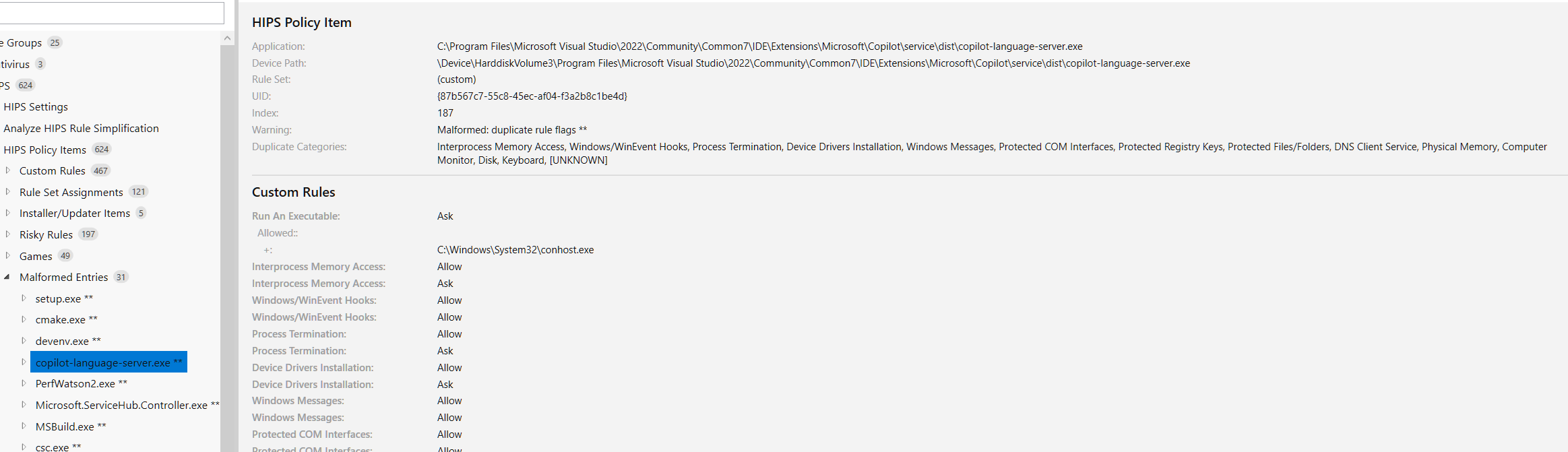
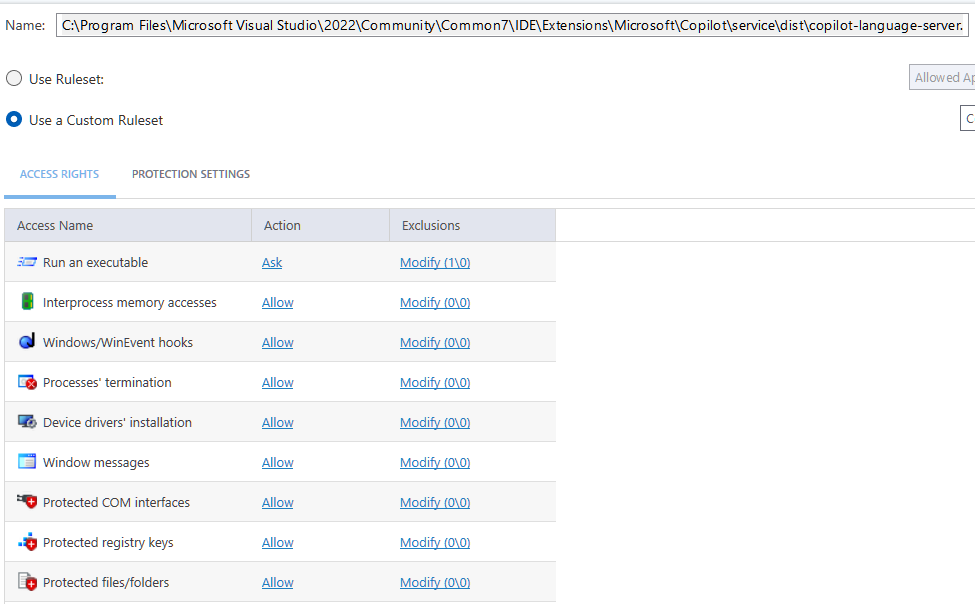
I am working on parsing the cfgx to help me generate better rules, and during this process I came across something that looked like an error in my application, but when I looked directly at the entries in the cfgx export I could see some entries that looked like this.
<PolicyItem UID="{87B567C7-55C8-45EC-AF04-F3A2B8C1BE4D}" Flags="0" Filename="C:\Program Files\Microsoft Visual Studio\2022\Community\Common7\IDE\Extensions\Microsoft\Copilot\service\dist\copilot-language-server.exe" DeviceName="\Device\HarddiskVolume3\Program Files\Microsoft Visual Studio\2022\Community\Common7\IDE\Extensions\Microsoft\Copilot\service\dist\copilot-language-server.exe" Source="3" Index="97" TreatAs="">
<Rules>
<Rule Flags="2" DefaultAction="4">
<Allowed>
<File UID="{9DB799D0-752F-41E9-A893-05AF64A88E6A}" Flags="0" Filename="C:\Windows\System32\conhost.exe" DeviceName="\Device\HarddiskVolume3\Windows\System32\conhost.exe" />
</Allowed>
<Blocked />
</Rule>
<Rule Flags="2097152" DefaultAction="1">
<Allowed />
<Blocked />
</Rule>
<Rule Flags="512" DefaultAction="1">
<Allowed />
<Blocked />
</Rule>
<Rule Flags="65536" DefaultAction="1">
<Allowed />
<Blocked />
</Rule>
<Rule Flags="8" DefaultAction="1">
<Allowed />
<Blocked />
</Rule>
<Rule Flags="16" DefaultAction="1">
<Allowed />
<Blocked />
</Rule>
<Rule Flags="256" DefaultAction="1">
<Allowed />
<Blocked />
</Rule>
<Rule Flags="128" DefaultAction="1">
<Allowed />
<Blocked />
</Rule>
<Rule Flags="64" DefaultAction="1">
<Allowed />
<Blocked />
</Rule>
<Rule Flags="32" DefaultAction="1">
<Allowed />
<Blocked />
</Rule>
<Rule Flags="4096" DefaultAction="1">
<Allowed />
<Blocked />
</Rule>
<Rule Flags="2048" DefaultAction="1">
<Allowed />
<Blocked />
</Rule>
<Rule Flags="1024" DefaultAction="1">
<Allowed />
<Blocked />
</Rule>
<Rule Flags="4" DefaultAction="1">
<Allowed />
<Blocked />
</Rule>
<Rule Flags="1" DefaultAction="1">
<Allowed />
<Blocked />
</Rule>
<Rule Flags="2097152" DefaultAction="1">
<Allowed />
<Blocked />
</Rule>
<Rule Flags="512" DefaultAction="4">
<Allowed />
<Blocked />
</Rule>
<Rule Flags="65536" DefaultAction="1">
<Allowed />
<Blocked />
</Rule>
<Rule Flags="8" DefaultAction="1">
<Allowed />
<Blocked />
</Rule>
<Rule Flags="16" DefaultAction="1">
<Allowed />
<Blocked />
</Rule>
<Rule Flags="256" DefaultAction="1">
<Allowed />
<Blocked />
</Rule>
<Rule Flags="128" DefaultAction="1">
<Allowed />
<Blocked />
</Rule>
<Rule Flags="64" DefaultAction="4">
<Allowed />
<Blocked />
</Rule>
<Rule Flags="32" DefaultAction="4">
<Allowed />
<Blocked />
</Rule>
<Rule Flags="4096" DefaultAction="1">
<Allowed />
<Blocked />
</Rule>
<Rule Flags="2048" DefaultAction="1">
<Allowed />
<Blocked />
</Rule>
<Rule Flags="1024" DefaultAction="1">
<Allowed />
<Blocked />
</Rule>
<Rule Flags="4" DefaultAction="4">
<Allowed />
<Blocked />
</Rule>
<Rule Flags="1" DefaultAction="4">
<Allowed />
<Blocked />
</Rule>
</Rules>
<Protections />
</PolicyItem>
As you will notice, for example Flag=1 for Interprocess Memory access is both set to Allow and Block, but, Why is it listed twice?
Checking in the User interface of Comodo, it seems to show the First rule.
Another interesting thing is the Flag 2097152 which doesn’t resolve to anything?
Here is how the python script parses this entry.
  [0] Flags=      2 [Run An Executable]: Ask  (1 allowed, 0 blocked)
      Allowed:
        + [entry Flags=    0]  C:\Windows\System32\conhost.exe
  [1] Flags=2097152 [[UNKNOWN]]: Allow  (0 allowed, 0 blocked)
  [2] Flags=    512 [Device Drivers Installation]: Allow  (0 allowed, 0 blocked)
  [3] Flags=  65536 [DNS Client Service]: Allow  (0 allowed, 0 blocked)
  [4] Flags=      8 [Protected Registry Keys]: Allow  (0 allowed, 0 blocked)
  [5] Flags=     16 [Protected Files/Folders]: Allow  (0 allowed, 0 blocked)
  [6] Flags=    256 [Computer Monitor]: Allow  (0 allowed, 0 blocked)
  [7] Flags=    128 [Keyboard]: Allow  (0 allowed, 0 blocked)
  [8] Flags=     64 [Disk]: Allow  (0 allowed, 0 blocked)
  [9] Flags=     32 [Physical Memory]: Allow  (0 allowed, 0 blocked)
  [10] Flags=   4096 [Protected COM Interfaces]: Allow  (0 allowed, 0 blocked)
  [11] Flags=   2048 [Windows/WinEvent Hooks]: Allow  (0 allowed, 0 blocked)
  [12] Flags=   1024 [Windows Messages]: Allow  (0 allowed, 0 blocked)
  [13] Flags=      4 [Process Termination]: Allow  (0 allowed, 0 blocked)
  [14] Flags=      1 [Interprocess Memory Access]: Allow  (0 allowed, 0 blocked)
  [15] Flags=2097152 [[UNKNOWN]]: Allow  (0 allowed, 0 blocked)
  [16] Flags=    512 [Device Drivers Installation]: Ask  (0 allowed, 0 blocked)
  [17] Flags=  65536 [DNS Client Service]: Allow  (0 allowed, 0 blocked)
  [18] Flags=      8 [Protected Registry Keys]: Allow  (0 allowed, 0 blocked)
  [19] Flags=     16 [Protected Files/Folders]: Allow  (0 allowed, 0 blocked)
  [20] Flags=    256 [Computer Monitor]: Allow  (0 allowed, 0 blocked)
  [21] Flags=    128 [Keyboard]: Allow  (0 allowed, 0 blocked)
  [22] Flags=     64 [Disk]: Ask  (0 allowed, 0 blocked)
  [23] Flags=     32 [Physical Memory]: Ask  (0 allowed, 0 blocked)
  [24] Flags=   4096 [Protected COM Interfaces]: Allow  (0 allowed, 0 blocked)
  [25] Flags=   2048 [Windows/WinEvent Hooks]: Allow  (0 allowed, 0 blocked)
  [26] Flags=   1024 [Windows Messages]: Allow  (0 allowed, 0 blocked)
  [27] Flags=      4 [Process Termination]: Ask  (0 allowed, 0 blocked)
  [28] Flags=      1 [Interprocess Memory Access]: Ask  (0 allowed, 0 blocked)
Any ideas?
My current thought is that these double entries are only apparentt when I have had two entries with near identical file paths (like this entry both on C: and F: drive, for example). but I am not sure. Another alternative was that maybe if those used a Ruleset first, that gets converted. But I haven’t been able to find out a clear pattern yet.
I also see entries in the cfgx export that only have 2 Flag entries, say for example Execute an App and DNS Access - both of which are set to allow, and all the other entries show up as “Ask” in the Comodo User Interface, but the xml export only contain two of these flags for the entry.
And here is a small teaser for the tool.
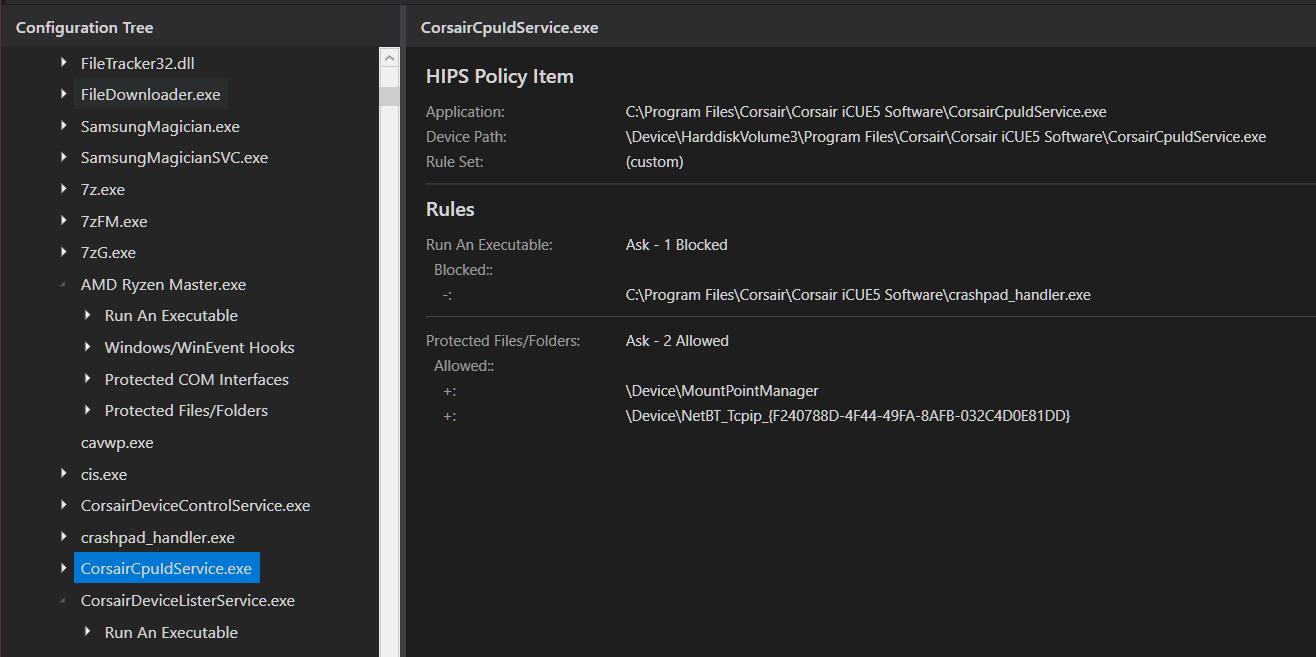
I have so many rules and the in-app configuration UI is too limited/cumbersome so I had to make this which will hopefully at some point let me generate and optimize rules that I can then import back into Comodo.