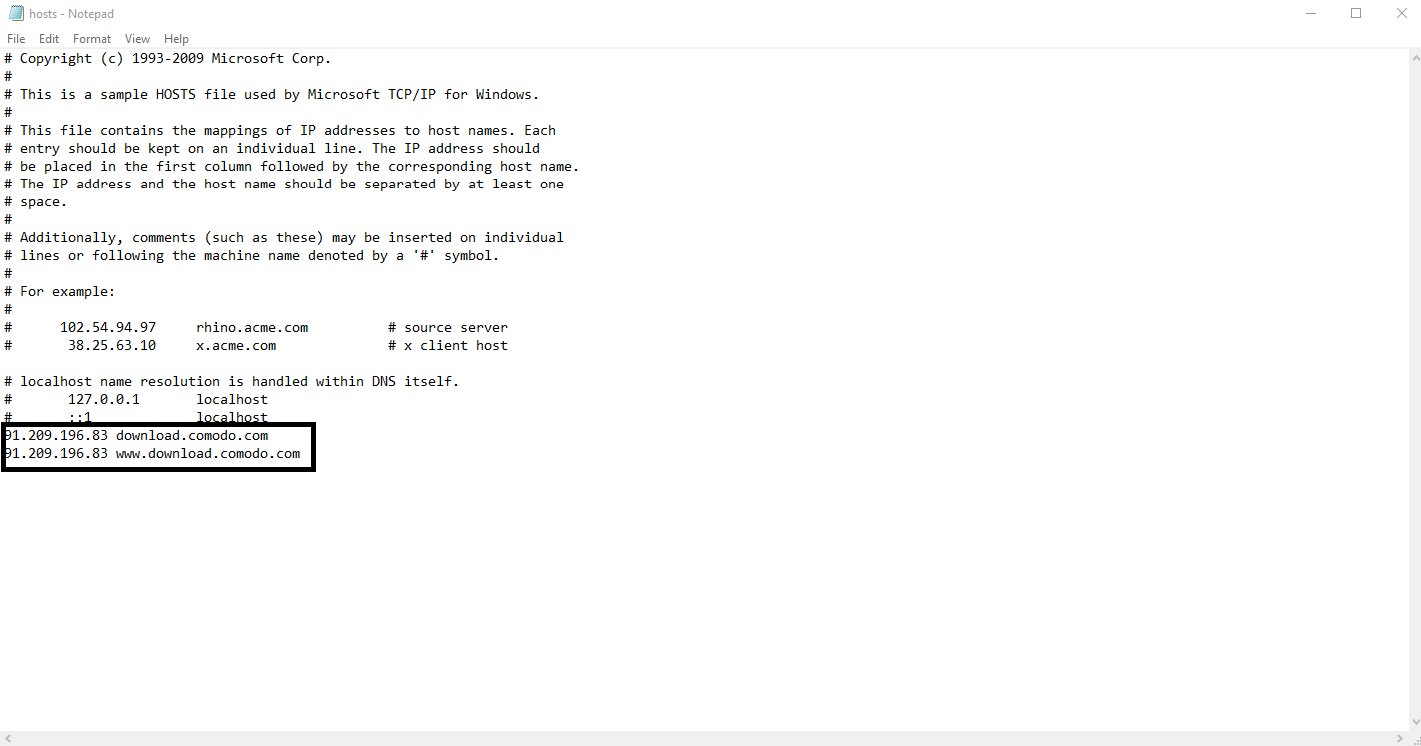
HOSTS file should be like this:
You need to run notepad as administrator to edit the HOSTS file.
EDIT: Actually the final version for CCAV has already been released so there is no need to do so. But above steps need to be taken to download CIS.
Jon79
July 1, 2017, 4:52pm
22
HOSTS file should be like this:
https://i.imgur.com/236gIoM.png
You need to run notepad as administrator to edit the HOSTS file.
EDIT: Actually the final version for CCAV has already been released so there is no need to do so. But above steps need to be taken to download CIS.
My understanding is that, if you set those entries in the host file, you download the v. 536 RC. If you don’t modify your host file, you download v. 537 final
Yes, don’t install Internet Security Essentials v1.2.421501.88 it will give you this SSL error (where you can’t access most of google’s site and this site for one.)
umesh
July 2, 2017, 7:32am
26
This is being investigated.
I installed the latest beta yesterday, today I could not access most SSL pages in Chrome, like this forum for example. So I uninstalled the beta and downloaded the latest CIS found on the homepage after I removed the entries from the host file. Now I still can’t access most SSL site on Chrome, using Edge atm.
Using CIS 10.0.1.6246, Database 27376
Update:Internet Security Essentials v1.2.421501.88 and rebooted, SSL works again. Your latest version is installed with cispremium_installer_6100_08.exe this case problems because I don’t have the Windows update mention available or installed. What does Internet Security Essentials v1.2.421501.88 include? where can I get the earlier version?
umesh
July 2, 2017, 1:12pm
28
Hi blackkatt,
So this bug is confined to new installations before you re-start PC.
However both CCAV and CIS requires system to be re-started upon installation.
We will issue a hot-fix for it early coming week.
Thanks
I installed the latest beta yesterday, today I could not access most SSL pages in Chrome, like this forum for example. So I uninstalled the beta and downloaded the latest CIS found on the homepage after I removed the entries from the host file. Now I still can’t access most SSL site on Chrome, using Edge atm.
Using CIS 10.0.1.6246, Database 27376
Update:Internet Security Essentials v1.2.421501.88 and rebooted, SSL works again. Your latest version is installed with cispremium_installer_6100_08.exe this case problems because I don’t have the Windows update mention available or installed. What does Internet Security Essentials v1.2.421501.88 include? where can I get the earlier version?
umesh
July 2, 2017, 1:16pm
29
Sorry, don’t follow. Did you re-start system and it still didn’t fix?
I’m afraid (sorry for the typ0) not. Like I said
After removing Internet Security Essentials v1.2.421501.88 and rebooted, SSL works again
But just to be sure. Are you saying, Re-install cispremium_installer_6100_08.exe, reboot? because that I already did.
umesh
July 2, 2017, 1:21pm
31
Let me PM you to investigate further.
umesh
July 5, 2017, 2:04pm
33
The same https issue could have been seen with CCAV.https://forums.comodo.com/beta-corner-ise/internet-security-essentials-v1242202592-rc-t119988.0.html
Thanks
I installed the latest beta yesterday, today I could not access most SSL pages in Chrome, like this forum for example. So I uninstalled the beta and downloaded the latest CIS found on the homepage after I removed the entries from the host file. Now I still can’t access most SSL site on Chrome, using Edge atm.
Using CIS 10.0.1.6246, Database 27376
Update:Internet Security Essentials v1.2.421501.88 and rebooted, SSL works again. Your latest version is installed with cispremium_installer_6100_08.exe this case problems because I don’t have the Windows update mention available or installed. What does Internet Security Essentials v1.2.421501.88 include? where can I get the earlier version?
Sure I try it, it’s the least I can do. I’ll report back soon.
Update!