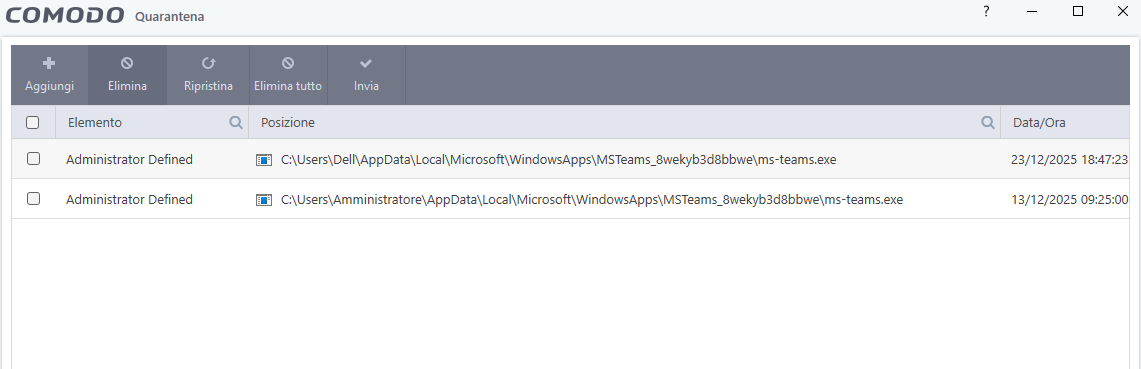
For some reason COMODO is blocking MS Teams right after startup… Can you take a look?
Hi TheMalwareMaster,
Thank you for reporting.
May I know the Teams version ?
Thanks
C.O.M.O.D.O RT
I don’t know, I am not using it on that PC fortunately… But it’s the last one
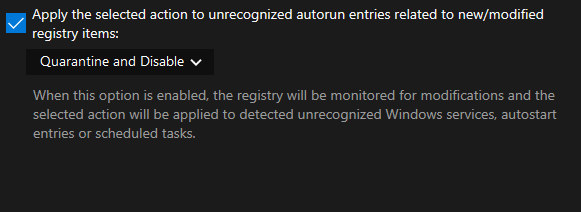
I’ve tested this myself and don’t see any issues. Many factors can contribute to adding files to quarantine, including file classification settings and the option shown in the image.
The files you’ve added to quarantine are so-called symbolic links with a 0KB footprint; they act as a shortcut for the system. Microsoft uses this method because the main files are protected.
Thanks for the clarification. Many of the errors mentioned here don’t appear on my PC.
For example, the one mentioned here:
Is COMODO blocking Windows updates for you?
Please note: I use Windows on a standard user account, secondly created. Updates only work on the admin account that have been created when the PC has been set up.
It works for me.
I’m no longer trying to reproduce the errors because afterward, things always stalled where there was nothing before, so I have to do another restore.
I don’t want to say that Comodo is completely bug-free, but most of the bugs didn’t appear on my PC.
I did not add anything to quarantine, it was added right before startup.
Please note that I use cruel sister config with “block” instead of “run restricted”
I checked again on the Proactive configuration and it seems that the main problem is a symbolic link that is unrecognized and isolated in the sandbox, while the main program it refers to is trusted.
I think that the restrictive crusister configuration contributes to the rest of the action.
I think that if you restore it from quarantine and then unblock it in the program options - unblock application, it will be ignored the next time you start your computer.

You are OT in this thread. Anyway the windows updates problems also occur to other users as shown here:
https://malwaretips.com/threads/comodo-blocks-windows-updates-with-error-0x80070005.138187/post-1153113
And the same user deep dived on the problem and found out the issue lies in the windir protected object inside HIPS: https://malwaretips.com/threads/comodo-blocks-windows-updates-with-error-0x80070005.138187/post-1156274
My Microsoft teams work just fine I got some scammers in my chat.