0x80072f8f when CIS uploads unrecognized files to COMODO

Exactly what I am saying is that there is a time, the Valkyrie is not being powered quickly by CIS customers.
It would be great if you had a quick fix for this problem.
The Valkyrie is losing her heart, as many dice and gifts are about to be taken and trained on her AI

but when i upload files to Valkyrie,Valkyrie works great it gives Malware verdicts

What you’re reading is being downloaded as or produced by XCitium.
Because there are times when the CIS does not go, if there is a fault, if there is a mistake or even when you go, it is not processed and there is no immediate response to the software.

Example: Let’s say you want to install a program on my machine now. and the CIS element is detected through the car’s contents or the digital card is not valid or is blocked because it is disconnected.
What I did and sent to VALKYRIE got the result, in a few minutes. I know that I don’t recommend installing the same Valkyrie as the truth, saying that it’s ok. I don’t recommend installing the program.

Or what you are doing is different for each person. Let’s point out that the team sees nice situations, which we deal with on a daily basis and that the forum is where we can solicit requests from the users.

This functionality has been very hit and miss for me. Sometimes it works, but it usually doesn’t. I didn’t used to have this problem and it didn’t happen exactly at the new version. It’s more recent than that.
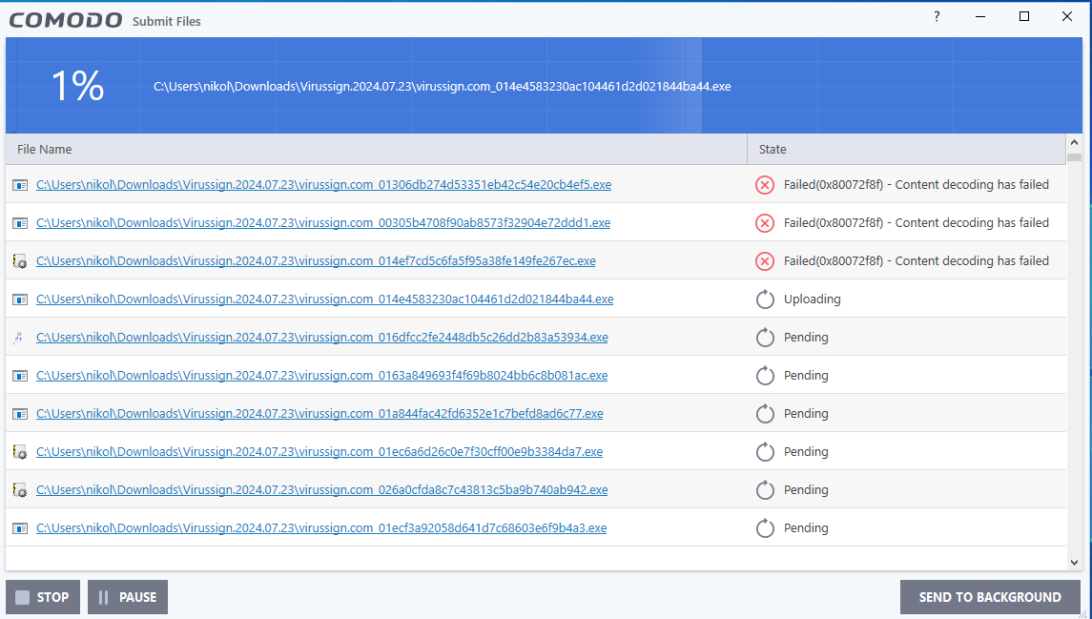

@C.O.M.O.D.O_RT @ilgaz This is concerning for me
Xcitium is one of the best clouds and now it does not work with Xcitium 2025 version
Please fix this as soon as possible

1 Like

Hi Nik123,

Thank you for reporting.
May i know the above files of the software ?

Thanks
C.O.M.O.D.O RT

its a databse for fresh malware samples i can give it to you to check it out

the last one there are these malwares that failed to upload to Xcitium

2 Likes

Greetings,

In the picture below are 35 new files that gives the same error message 0x80072F8F.

Eric Cryptid said on July 7th 2024 on this thread “Sometimes it’s due to file size or type or if other files are being analyzed in the background”. I checked some files in the 35 files list and some were .exe of 696 kb or .dll of 124 kb. This leaves the other option that something in the background could be interacting with the files (such as other AV as New_Style_xd suggested on July 7th 2024 in this thread)? Or did Eric meant the files would be analyzed by CIS itself (as no CIS scan was running at the time of submission and they aren’t in the “Blocked Applications” list).

I tried disabling Microsoft Defender integrated AV, but still the 35 unrecognized files cannot be submitted to COMODO.

Is there a way to overcome the error 0x80072F8F itself when CIS handles unrecognized files?

Thanks in advance,

B

Edit: As the unrecognized files could be “analyzed” in the background (preventing them from being sent), I tried booting in Safe Mode with Networking to have CIS upload them to COMODO, but the Wi-Fi connection is the only method this PC has to connect to internet (and Wi-Fi isn’t supported in Safe Mode).

Thus, in Windows, I created a folder for testing purposes and copy-pasted in it all the 35 unrecognized files mentioned in this reply. Then, via CIS main menu, I clicked on “Unrecognized Files” button, selected all 35 files and clicked the “Remove” button (to reset the unrecognized files list in CIS). I then had CIS scanning only the content of new testing folder and CIS listed back the unrecognized file (now originating from the new folder). I had the PC reboot and tried afterward, via CIS, to upload to COMODO the unrecognized files in the testing folder, but they would still prompt the error 0x80072F8F. Thus, I now have reasons to doubt that something is interfering with the files in the testing folder which was the last hypothesis as to why unrecognized files could not be submitted to COMODO. At this point, I don’t know how to interpret the 0x80072F8F error.

1 Like

It might also be an issue with Comodo servers. You can manually change them to Trusted if you for example check them on VirusTotal.

@C.O.M.O.D.O_RT - can you check the server is working at your end?

Status is currently showing as up: Comodo Status. Check if Comodo is down or having an outage. | StatusGator

You can also check whether files that were submitted were successful or not on the Submitted Files page

1 Like

Hi EricCryptid,

The server is working fine at our end.

Thanks
C.O.M.O.D.O RT

Thanks for checking.

I just tested it, and it’s not working.
Even though the site shows the command status as OK, the files still aren’t being sent.

For me this function hasn’t worked for months. It’s always been pretty spotty, but for awhile it was somewhat reliable. Now I don’t even bother submitting anything because it fails every time.

2 Likes

Thanks for the quick reply Eric.

Surprisingly, a few days ago, I did submit to COMODO via CIS the unrecognized files found by CIS (maybe there were 50?); some were submitted, some were marked as safe and some shown the error 0x80072F8F.

Since: 1) C.O.M.O.D.O_RT said that “The server is working fine…” and; 2) I noticed that, at one point, some files were submitted successfully to COMODO while some files produced the error, but the very same unrecognized files keep failing to upload even at different moments , this strengthens the conclusion that the server is fine. Considering this new info, could the issue be file specific or maybe even client related?

I tried uploading every unrecognized files to VirusTotal in the hope of identifying whether they would be infected and if so this could maybe explain why they wouldn’t upload to COMODO server. All files were clean except three that were flagged by one AV (Skyhigh (SWG)) as possible threats (BehavesLike.Win32.Dropper.wh or BehavesLike.Win32.NetLoader.ch) out of 70 AV which suggests those are false positives.

Interestingly, there are some discrepancies between the name of the files on the PC and the name listed on VirusTotal although the SHA-256 found by PowerShell on the PC matches the one found by VirusTotal for all files. Thus, I was wondering whether this file name “issue” could explain the “Content decoding has failed” label of error 0x80072F8F. It seems this difference would only be due to the files harboring a different internal (metadata) original filename than the actual file name. Hence, since files that were never uploaded to VirusTotal had the same name both on the PC and on VirusTotal and are producing the error 0x80072F8F this suggests that CIS upload doesn’t fail due to different names for a same file. For example, logi_system_tray.winmd and globmerger.sys files were never uploaded to VirusTotal and had the same name both on the PC and on VirusTotal.

I’m adding a file containing the unrecognized files hash and their URL to VirusTotal.

Unrecognized files info.txt (12.6 KB)

I hope these results might help. Let me know if I can help to further troubleshoot in order to get a resolution for this error code.

Thanks for keeping us updated.

B

2 Likes