Hi
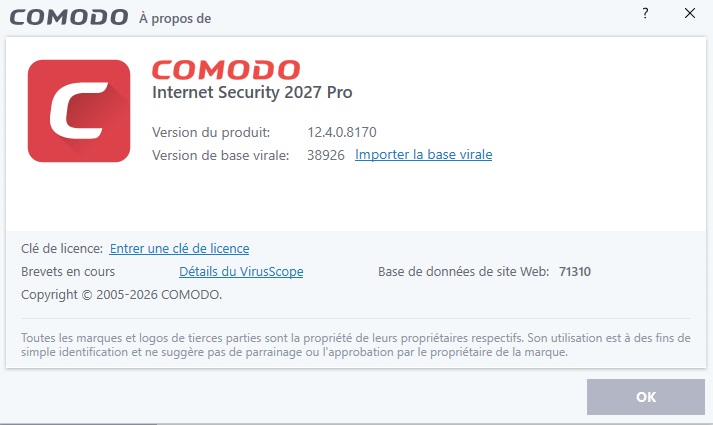
Since yesterday, Comodo Internet security 2027 v 12.4.0.8170 has been asking me for a license key to be able to continue using the software. Why?
I’m going to try restarting the computer to see if that fixes it.
That’s probably because you installed COMODO PRO.
Take a screenshot of the “About” screen so we can see which version you’re using.
I just ran the test and the result was the same; it still won’t connect to the internet, even after changing the Comodo profile.
If there is another solution within Comodo that I can try, please let me know.
Did you do any tweaks with the Internet Security Configuration or leave as default?
I set it to default, chose the Internet Security profile, and restarted the computer.
Hi New_Style_xd,
Thank you for reporting.
We will check and take this to the team notice.
Thanks
C.O.M.O.D.O RT
1 Like
The restart does not change anything
Indeed it’s the Pro version that is installed.
If it was really the Pro version I should have the VPN, which is not the case.
But how to get the Premium version? And why did it work well for 1 month?
The link below installs the Pro version and not Premium!
https://download.comodo.com/cis/download/installs/9090/standalone/cispro_installer.exe
1 Like
https://download.comodo.com/cis/download/installs/9090/standalone/cispremium_installer.exe here is the link
Indeed my download link was not the right one. Yet it was the one given at the beginning of the post
Thanks
1 Like
Strangely enough, in the suspicious files detected by COMODO, a large part of them are CIS programs, such as: cmdres.DLL / cmdwrhlp.DLL… Astonishing!
Do an Online Lookup in CIS. Sometimes it doesn’t get time to check a handful of files when you first install though it’s pretty rare. If they are trusted, it’ll automatically allocate them as that.
i tested briefly internet security 2027. my motive is to find simple antivirus, which is not microsoft defender and it is not too invasive.
installation installs internet security 2027 as a whole, firewall or antivirus cannot be separately selected or unselected.
firewall and antivirus can be disabled by settings, but doing so enables ms defender or defender firewall.
windows user interface is not clear. older user interface and settings program show that windows firewall is on, but newer settings program show either comodo firewall or windows firewall. it seems that comodo disables windows firewall at component level.
container could be useful, but i would like no internet container, where program is isolated without internet with easy click. this can be done with messing with firewall, but is many clicks. although, there is total block.
because one of my motives is to replace microsoft defender, i don’t think comodo fits for such purpose. defender components are still there, even though they are not used.
Are we going to get an automatic update from 12.3.4.8162 to this version at some point, or do we have to uninstall the previous version and install the new one?
1 Like
That’s a very good question; I’ve actually mentioned this before. I have several clients using the old version, and I wish Comodo would implement an automatic internal update feature so the application could be updated without needing to uninstall and reinstall it—which would save us all a lot of extra work.
I am currently waiting for a response from the developers regarding this matter, as it is of interest to everyone on the forum.
1 Like
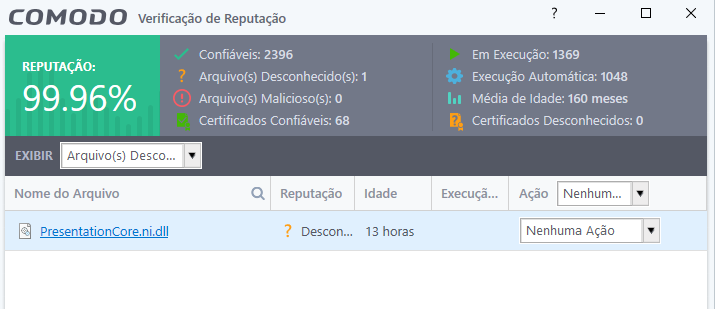
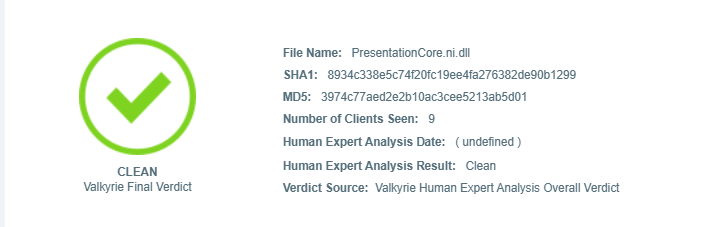
Good morning. I checked the file reputation in Comodo and found one unknown file.
My question is: how can it be unknown if Comodo recognizes it as clean? Take a look at the images below:
1 Like
Sorry, it didn’t provide an answer.
Hi taysil,
Yes. The automatic update has been pushed to the existing CIS once the new version is released.
Thanks
C.O.M.O.D.O RT
Hi New_Style_xd,
Thank you for reporting.
We will check and update you.
Thanks
C.O.M.O.D.O RT
Sorry, I am not sure if I understood what you mean. Do you mean it is already pushed (in which case I am not seeing it), or do you mean it will be available with the next version?
2 Likes