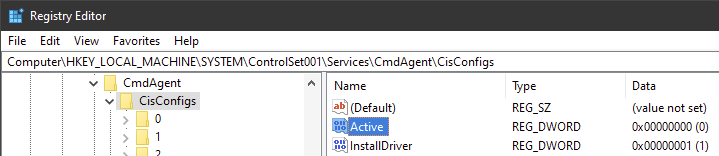
I was bored have found out why the UI was failing to load for me but works for some others, as well as with a solution. It seems to be something related to using a custom CIS config instead of the 3 default ones. but just toggling from my custom config to the stock ones seems to have been all that’s needed to make the UI get back to working, Unfortunately I see no way to do this through a simple CLI flag so I had to do it through the registry.
- boot into safemode
- open regedit and navigate to HKEY_LOCAL_MACHINE\SYSTEM\CurrentControlSet\Services\CmdAgent\CisConfigs
- set the “Active” key from 3 to 0
- reboot
now the UI works perfectly and I can even load my custom config and it stays working even after subsequent reboots, I don’t know why this solution works, to me it doesn’t make much sense but if I were to take a guess the configs are hashed against the binary which becomes unrecognized and just by changing to another config it has to re-hash the “invalid” one.