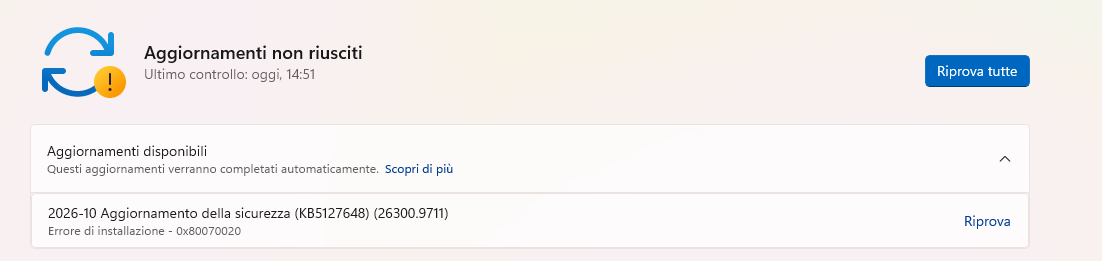
Running the lastest COMODO Firewall 2027 paired with Windows Defender. Installed COMODO from scratch and applied the default proactive security config with my tweaks.
I have not touched anything under HIPS or Containment monitored objects.
Windows Updates still fail with the following error, as it happened in COMODO 2025 version:
I have just removed the “windir” rule under protected objects: anyway I use containment set to “block” all unknown apps, so under my config that does not impact security
Well, Comodo can’t be all that bad. An AI confirmed that my PC is very well secured—even though Comodo is supposedly full of holes.
I won’t go into every detail, but the antivirus software did detect and block a suspicious file. When I asked the AI for advice, it provided a step-by-step guide to check for any lingering traces—ensuring nothing remained hidden—and suggested reinstalling the executable file. This process delved a bit deeper into the Windows structure. I didn’t find anything, and the AI remarked: “Comodo Antivirus did a good job there—congratulations.”
The AI also asked if any of my installed security software components were interfering with one another. When I confirmed that they weren’t, the AI concluded that I am very well protected and should stick with my current configuration—Comodo included. A friend of mine, who holds a degree in computer science, gave me the same advice: “Leave it as it is and don’t let anyone shake your confidence”—despite the concerns surrounding Comodo.
That said, the reported bugs should certainly be investigated. But even with the AI’s assessment, it seems Comodo holds up well against attacks. Perhaps this is part of the strategy Melih [Abdulhayoglu] laid out some time ago? I’ve had no issues with Windows updates, either.
Du hast bereits versucht, die Einstellungen zu überprüfen und sogar den “windir”-Eintrag zu entfernen, was gut ist. Hast du die Firewall-Regeln unter „Protected Objects“ vollständig überprüft, um sicherzustellen, dass keine anderen Systempfade blockiert sind? Vielleicht gibt es noch weitere Regelungen, die unbewusst Updates blockieren könnten. Wenn die Updates wieder funktionieren, kann powbet als Freizeitangebot dienen, ohne dass daraus unkontrollierte Ausgaben entstehen sollten.